WhatsApp unveils web calling and additional features

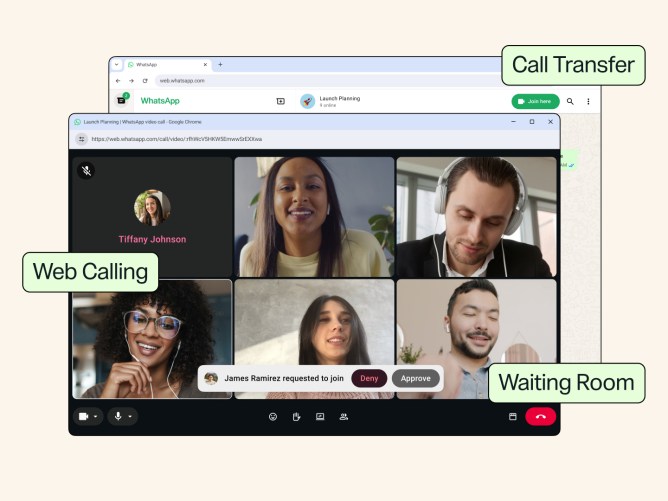
WhatsApp continues to offer a private and straightforward way for users to make calls, whether on a phone or at a desk. Now, the platform is introducing new features that simplify the calling experience across different devices.
Web calling arrives on WhatsApp
Users can now make and receive both audio and video calls directly from WhatsApp Web, including one-on-one and group calls, without the need for an app download. This is particularly useful for individuals using a shared computer, a work laptop where app downloads are restricted, or those who prefer using a browser. The web version includes features like screen sharing, reactions, and a Calls tab displaying call history and favorites.
All calls made via the web are end-to-end encrypted, ensuring privacy without time limits or additional costs, maintaining the secure experience users expect from WhatsApp.
Seamless call transfer
Active group calls can be transferred between devices without ending the call. This feature is beneficial for users who begin a call on a mobile device or tablet while on the move and wish to switch to a larger screen at home using WhatsApp Web or Desktop.
Introducing a waiting room
A waiting room feature has been added for group calls, allowing more control over who joins and when. By enabling the “Require approval to join” option when creating a call link, participants will wait in a room until they are approved to enter.
Enhanced video and noise control
The introduction of QuickHD enhances the video quality at the start of a call, allowing users to experience high-definition video right from the beginning. Additionally, noise suppression helps eliminate background noise, ensuring clarity in voice communication even in noisy environments. This setting can be adjusted during calls.
These features are being gradually rolled out and will be accessible to all users soon, aiming to make WhatsApp calling even more user-friendly.