
Samsung AMS Enhances Classroom Displays with Personalized and Secure Teacher Workspaces

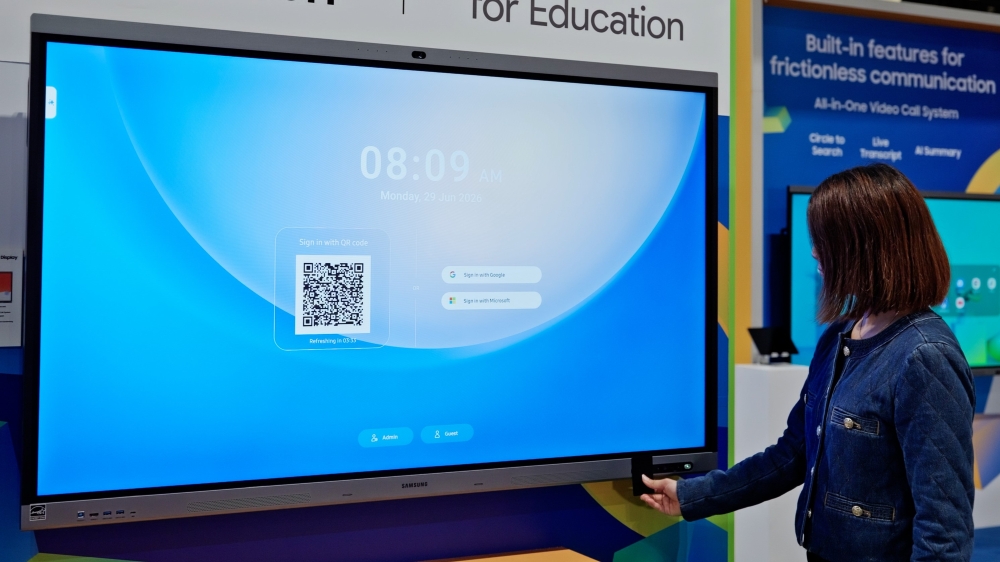
Interactive displays have become integral to modern classroom instruction, serving as a central hub for accessing lesson materials and digital tools. However, shared displays can pose challenges in maintaining personal settings and consistent user experience for teachers.
Samsung’s Account Management Solution (AMS) addresses this by transforming shared Samsung Interactive Displays into personalized, secure workspaces that accompany teachers across different classrooms. Through seamless sign-in and cloud-connected profiles, educators can swiftly access their files, applications, and settings from any location within the school.
Personalized Workspaces for Educators
Samsung AMS enables educators to access a secure, cloud-connected workspace on compatible Samsung Interactive Displays. Teachers can sign in using a QR code or NFC-enabled ID card, immediately accessing their personalized content without needing to enter passwords in front of students.
Once signed in, the system automatically loads the educator’s files, apps, wallpaper, bookmarks, and shortcuts, creating a tailored teaching environment. This functionality ensures a consistent experience across classrooms, as highlighted by Jelena Živko, Senior Instructional Technology Specialist at Volusia County School District.
“If I’m a math teacher and I have to teach in various classrooms, I can sign in, and everything is ready to go, my lesson is there for me,” remarked Živko. “I have access to all of my files, tools, and preferences, allowing me to customize the workspace to best fit my needs.”
Additionally, Samsung AMS provides single sign-on access to the Samsung AI Assistant app, eliminating the need for repeated log-ins. This feature allows educators to seamlessly draw from previous lesson materials and AI-generated summaries.
Streamlining IT Management with Samsung Education Portal
With an increasing number of shared classroom displays, schools require efficient management tools. The Samsung Education Portal simplifies these tasks, providing IT teams with a centralized platform to manage teacher accounts, enrolled displays, and emergency alerts.
The portal enables IT teams to register teachers, enroll displays, and link NFC-enabled ID cards to user accounts from a single interface. Displays can be organized by location via tags, facilitating large-scale deployments. Moreover, the portal integrates with major notification platforms, such as InformaCast and Raptor, to streamline emergency alert management.
Upon receiving an emergency signal, appropriate alerts are automatically displayed across enrolled Samsung Interactive Displays, offering a visual method of communicating urgent information throughout the building. Leah Fuller, Sr. Manager Vertical Sales Leader at Best Buy Education, emphasized the reassurance this feature provides to staff, students, and families.
Through personalized teacher experiences and simplified display management, Samsung AMS aids schools in creating secure and seamless learning environments.
Note: Features and availability are dependent on compatible Android-based Samsung Interactive Displays, and may vary by model and region. Emergency Alert features require a subscription to a compatible notification platform.


